Foot Locker - Shop Releases
- 4.3
- Rating
- 5.00M
- Installs
- Free
- Price

 Analysis by App-foxy
I spent time with Foot Locker - Shop Releases as a shopping app, using it mainly for browsing sneakers, checking whether a release looked worth following, and deciding when it was easier to shop through Foot Locker than through a general marketplace. My first impression was straightforward: this is a focused companion for people who already know the Foot Locker name and want a mobile route into its sneaker catalog, rather than a broad shopping platform that happens to sell shoes.
That focus is useful. I did not have to work through unrelated product categories before reaching footwear, and the app’s purpose was clear from the moment I opened it. At the same time, the experience is not equally valuable for everyone. If you want a giant comparison engine across many retailers, a resale marketplace, or a dedicated shoe-review community, this is not the right tool. If you prefer buying from Foot Locker and want a convenient way to browse releases on a phone, it makes considerably more sense.
How the app feels in its current form
The app is free, aimed at Everyone, and developed by Foot Locker, Inc. Its long presence on mobile is reflected in its release history: it launched on March 26, 2015, and the current version is 9.6.0. That combination tells me this is an established retail app rather than a short-lived experiment. It has also reached over five million installs, so its role is clearly larger than a niche sneaker utility.
You May Also Like

 Blood Strike: 2.5 Anniversary
Blood Strike’s Loadouts Turn Every Drop Into a Tactical Gamble
A close look at Blood Strike’s custom loadouts: how fast access to signature weapons reshapes its battle royale rhythm, rewards preparation, and narrows the gap between fights.

 Pandora - Music & Podcasts
Pandora’s Music Is Easy to Start, but Harder to Recover
Pandora’s strength is its low-effort path from a seed to a station. Its weak spot is how much confidence it asks you to place in connection, setup, and quiet recovery.

 8 Ball Pool
 Is Built on Rivalries, Rematches, and Routine
A close look at the rivalries, rematches, shared routines, and unanswered safety questions that turn a quick pool match into a persistent mobile community.

 Samsung Music
’s Quiet Strength Is Playing What You Already Own
Its reach comes less from spectacle than from dependable access to a personal library. That simplicity is both the app’s strongest retention engine and its ceiling.

 AccuWeather: Weather Radar
AccuWeather Review: A Quick, Clear Forecast for Everyday Decisions
For everyday plans, the best forecast is the one you can understand quickly. AccuWeather makes rain timing, radar, and local conditions easy to act on, with a few trade-offs.

 Hill Climb Racing
Why Hill Climb Racing Still Turns Crashes Into One More Run
A tiny car, a bumpy hill and one more upgrade: Hill Climb Racing keeps resurfacing because its simple chaos makes every near-miss feel personal.
More From Our News Desk



Its average rating sits at three out of five from roughly sixty-four thousand ratings, with about nineteen thousand written reviews. I would read that as a reason to keep expectations practical. The app has a substantial user base, but popularity does not automatically mean every shopper will find the experience smooth. Retail apps are especially sensitive to stock changes, checkout pressure, account issues, and differences between regions, so a middling average can reflect the full buying journey rather than the basic act of opening product pages.
For me, the strongest part of the current experience is its directness. The app is built around Foot Locker’s own shopping environment, not around trying to become a universal sneaker database. That makes it useful when I already have a brand, silhouette, color preference, or release in mind. It is less helpful when I am still defining what I want and need educational guidance before spending money.
Browsing works best when I begin with a purpose
I would not open this app with the vague goal of “finding something interesting” unless I had time to browse. A better workflow is to start with a clear shopping question: do I want a new everyday pair, am I checking a particular release, or am I looking for a gift in a certain style? The narrower the starting point, the more useful a retailer-focused app becomes.
That approach also reduces a common shopping mistake: treating an attractive product image as enough information to buy. I use the app to create a shortlist, then pause to think about fit, intended use, and whether the design actually works with what I already wear. A dedicated sneaker retailer can make browsing feel exciting, but it can also encourage impulse decisions if I treat every visible release as urgent.
My practical tip is to use the app for discovery and purchase planning, not as the only source of judgment. Before committing, I check the size I normally wear, consider whether the shoe is for daily use or occasional wear, and compare the product choice with alternatives I have already saved or seen elsewhere. That small pause is particularly useful when a release looks appealing but does not solve a real need.
What the version history tells existing users
The move to version 9.6.0 shows ongoing product maintenance, but a version number alone does not prove that every part of the app has changed dramatically. I would separate what is visible today from what I might hope future updates will improve. The current release should be judged by how reliably it supports browsing and shopping, while the broader history suggests that Foot Locker continues to keep the mobile product active.
For someone who has used an older edition, the most important question is not whether the number is higher. It is whether the app now feels dependable during the moments that matter: finding a product, understanding the available choice, moving through the buying process, and returning to the app without losing the thread of a search. Those are the areas where retail software earns trust.
I also think regular users should treat updates as part of the normal experience rather than assuming the app will remain identical. A retailer can change how it presents releases, organizes products, or handles account activity over time. That may bring improvements, but it can also make familiar routes feel different. If the app becomes less comfortable after an update, I would first revisit the basic browsing path instead of assuming a favorite feature has disappeared permanently.
Where it fits in a real shopping routine
Imagine I am looking for a pair to wear on a weekend trip. I open the app, browse the available sneaker selection, narrow my attention to styles that can handle repeated walking, and compare a few options without visiting a store immediately. I am not trying to solve every footwear question in one session. I am using the app to reduce the first part of the search: seeing what Foot Locker offers and deciding whether one of those options deserves a closer look.
That same routine works for a last-minute gift, although I would be more cautious. A recipient’s size and style preferences matter more than the excitement of a new release. I would use the app to inspect choices, then confirm the practical details before ordering. A retailer app is helpful for reducing travel and browsing quickly, but it cannot replace knowing whether the gift recipient prefers a narrow or roomy fit, a low-profile shoe, or a more noticeable design.
For release-focused shoppers, the value is different. The app gives a Foot Locker customer a dedicated place to check the retailer’s sneaker activity instead of relying only on general web searches. That can make the app a convenient first stop, especially when I already expect to buy through Foot Locker. It should not be confused with a guarantee that a desired pair will be available when I want it; retail availability can change quickly, and an app cannot turn limited stock into unlimited stock.
Strengths, trade-offs, and the best way to use it
I’d use this section to weigh what the app does well against the limits of shopping through one retailer, then offer a practical way to keep browsing from turning into a rushed purchase. For shared devices, that distinction matters: a clear shopping plan can help household members coordinate without assuming the app manages separate family needs for them.
Why a focused retailer app can beat a general marketplace
Compared with a broad marketplace, this app has a clearer identity. A general platform may offer more sellers, more product types, and more price variation, but that variety can make it harder to know where a listing comes from or whether two apparently similar products belong to the same buying context. Foot Locker’s app is more useful when I want a direct relationship with one established sneaker retailer and do not want to sort through unrelated listings.
Compared with visiting a physical store, the app is more convenient for early research. I can browse without traveling, revisit a decision later, and use a quiet moment to compare styles. The trade-off is that the phone screen cannot provide the same physical sense of materials, proportions, or fit. I can inspect images and information, but I cannot try the shoe on through the app. For a familiar model and a known size, that may be acceptable. For an unfamiliar shape, an in-person option remains better.
Compared with a resale service, the app serves a different purpose. I would choose a resale marketplace when I am searching for an older release, a hard-to-find size, or a product no longer available through ordinary retail channels. I would choose Foot Locker’s app when I want to browse its current retail selection and prefer a simpler path than negotiating with individual sellers. Neither approach replaces the other; the right choice depends on whether I value retail convenience or access to a wider secondary market.
Three useful habits that are easy to overlook
- Separate browsing sessions by purpose. I get better results when I use one session to discover styles and another to make a purchase decision. Mixing the two encourages me to buy before I have considered fit, use, or budget.
- Use the app as a shortlist builder. Rather than opening product pages repeatedly without a plan, I note the few pairs that genuinely match my needs and compare those choices. This makes the retailer’s focused catalog more manageable.
- Keep a backup plan for time-sensitive shopping. If I am shopping around a release or a gift deadline, I do not rely on one mobile route alone. I decide in advance whether I would visit a store or use another retailer if the desired option is not workable.
These habits matter because the app’s convenience can hide the difference between product discovery and successful ownership. A good-looking release is only one part of the decision. Size, intended wear, timing, and the consequences of a poor fit all matter after the screen is closed.
What may frustrate shoppers
The biggest limitation is the natural boundary of a single-retailer catalog. If Foot Locker does not carry the exact model, color, or size I want, the app cannot compensate with inventory from another seller. That is not a flaw unique to this product, but it is important when deciding whether to make it the center of a sneaker search.
The three-out-of-five average also makes me wary of assuming a flawless experience for every shopper. I would approach the app as useful but not unquestionable. A retailer application can be pleasant for browsing and still disappoint someone whose main concern is a specific stock situation, a complicated purchase, or a problem that requires support. When the shopping task is urgent, I prefer having an alternative route ready.
Another trade-off is the balance between convenience and impulse. A dedicated release-oriented shopping environment can keep new sneakers in front of me, which is helpful when I am actively looking. It is less helpful when I am trying to avoid unnecessary spending. I would recommend turning casual browsing into a deliberate activity: set a purpose before opening the app and close it once that purpose is complete.
Who should download it, and who should skip it?
I would recommend it to a shopper who already buys from Foot Locker, follows sneaker releases, or wants a mobile-first way to inspect the retailer’s offerings. It is also a reasonable choice for someone who dislikes wandering through a huge general marketplace and prefers a more recognizable shopping destination. The free price removes the main barrier to trying it, so the decision mostly comes down to whether Foot Locker’s catalog and shopping route match your habits.
I would be more hesitant to recommend it to someone who wants extensive cross-store price comparison, resale access, detailed community opinions, or a tool centered on wardrobe planning rather than retail shopping. That person may get more value from combining a retailer app with a comparison service and independent fit research. I would also suggest caution for anyone who needs to inspect a shoe physically before buying; no mobile catalog can reproduce the experience of trying on the actual pair.
Parents and gift buyers may appreciate the Everyone age rating, but the practical challenge is still choosing correctly. The rating describes who can use the app, not whether a particular purchase will be suitable. I would involve the recipient in the size and style decision whenever possible, especially for a higher-cost gift or a shoe intended for regular wear.
What I would watch in future releases
Because version 9.6.0 is the current release, I would watch future updates for improvements that make the shopping journey clearer rather than simply adding more promotional material. The details I care about are practical: easier movement from discovery to decision, transparent product information, dependable handling of changing stock, and a checkout path that does not create unnecessary uncertainty.
I would also pay attention to how the app serves two different audiences: the casual shopper who wants a dependable pair and the enthusiast following a particular release. Those users need different kinds of clarity. The first values straightforward selection and confidence in the purchase. The second values timely, precise release information. A strong update should support both without making the app feel crowded or overly complicated.
My final view is positive but measured. Foot Locker - Shop Releases is a useful shopping app when I treat it as what it is: a focused mobile doorway into Foot Locker’s sneaker business. It is free, established, and easy to justify trying if the retailer is already part of your shopping routine. Its weaknesses come from the same focus that makes it convenient: the catalog is not the whole sneaker market, mobile browsing cannot replace fit testing, and a middling average rating is a reminder to keep expectations realistic.
I would keep it installed if I regularly shop at Foot Locker or want one convenient place to monitor its sneaker selection. I would not use it as my only research tool, especially for a rare release, an unfamiliar fit, or a purchase with a strict deadline. Used alongside sensible comparison and a little patience, it can save time and make release browsing more organized. For me, its real value is not replacing every other sneaker resource; it is making Foot Locker’s part of the search quicker and easier to manage.
FAQs for Foot Locker - Shop Releases
01What features does the Foot Locker app offer?
The Foot Locker app provides a comprehensive shopping experience with features like browsing the latest sneakers, exclusive releases, and apparel collections. Users can also track orders, access their Foot Locker VIP account for rewards, and receive personalized recommendations. The app also offers store locators and notifications for upcoming sales and events.
02How does the release calendar work in the Foot Locker app?
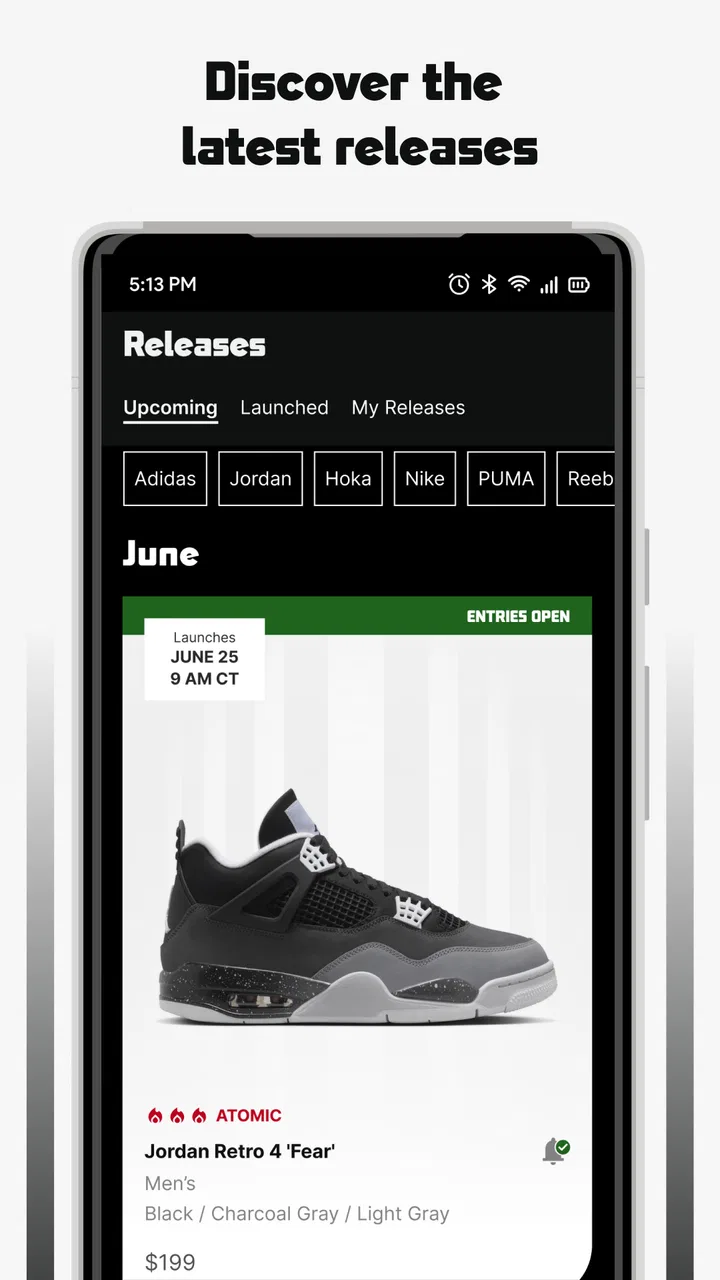
The release calendar in the Foot Locker app is designed to keep sneaker enthusiasts updated on upcoming releases. It provides detailed information on new sneaker launches, including release dates, pricing, and availability. Users can set reminders for specific releases and receive notifications as the launch date approaches, ensuring they never miss out on popular drops.
03Is it possible to reserve sneakers through the Foot Locker app?
Yes, the Foot Locker app allows users to reserve sneakers for select releases. Through the app's Launch Reservation system, users can enter raffles for the chance to secure their favorite sneakers ahead of time. This feature is available in participating locations and helps users avoid the hassle of long queues and sold-out notices.
04Are there any exclusive app-only offers or promotions?
Foot Locker frequently offers app-exclusive promotions and deals to users. These may include limited-time discounts, early access to sales, or special offers on certain products. By enabling notifications, users can stay informed about these exclusive opportunities, ensuring they make the most of their shopping experience.
05What should I do if I encounter issues with the Foot Locker app?
If you experience any issues with the Foot Locker app, there are several ways to resolve them. First, ensure your app is updated to the latest version. If problems persist, try restarting your device or reinstalling the app. For further assistance, the app provides a customer service option where users can contact support for help with technical difficulties or inquiries.
Pros
- Easy-to-navigate interface.
- Exclusive early access to sales.
- Real-time release updates.
- Comprehensive sneaker selection.
- Personalized product recommendations.
Cons
- Occasional app crashes.
- Limited international shipping.
- Some items sell out quickly.
- Notifications can be overwhelming.
- Limited search filter options.

Foot Locker - Shop Releases
Gallery